


When you outsource accounting work, you are not just making a staffing decision. You are making a security decision that affects every client whose data you share with the offshore team. This is not about paranoia or worst-case thinking. It is about prudent risk management. Client data includes tax returns, bank statements, payroll records, and financial information that could damage businesses or individuals if mishandled, disclosed, or breached. Your responsibility to protect this data does not change when you delegate tasks to an offshore partner.
This checklist is designed to be used during vendor evaluation and implementation. It is not comprehensive enough to replace consultation with cybersecurity professionals or legal counsel, but it covers the foundational controls that should be in place before any client data is shared offshore. Use it to evaluate providers, structure your contracts, and audit your own procedures.
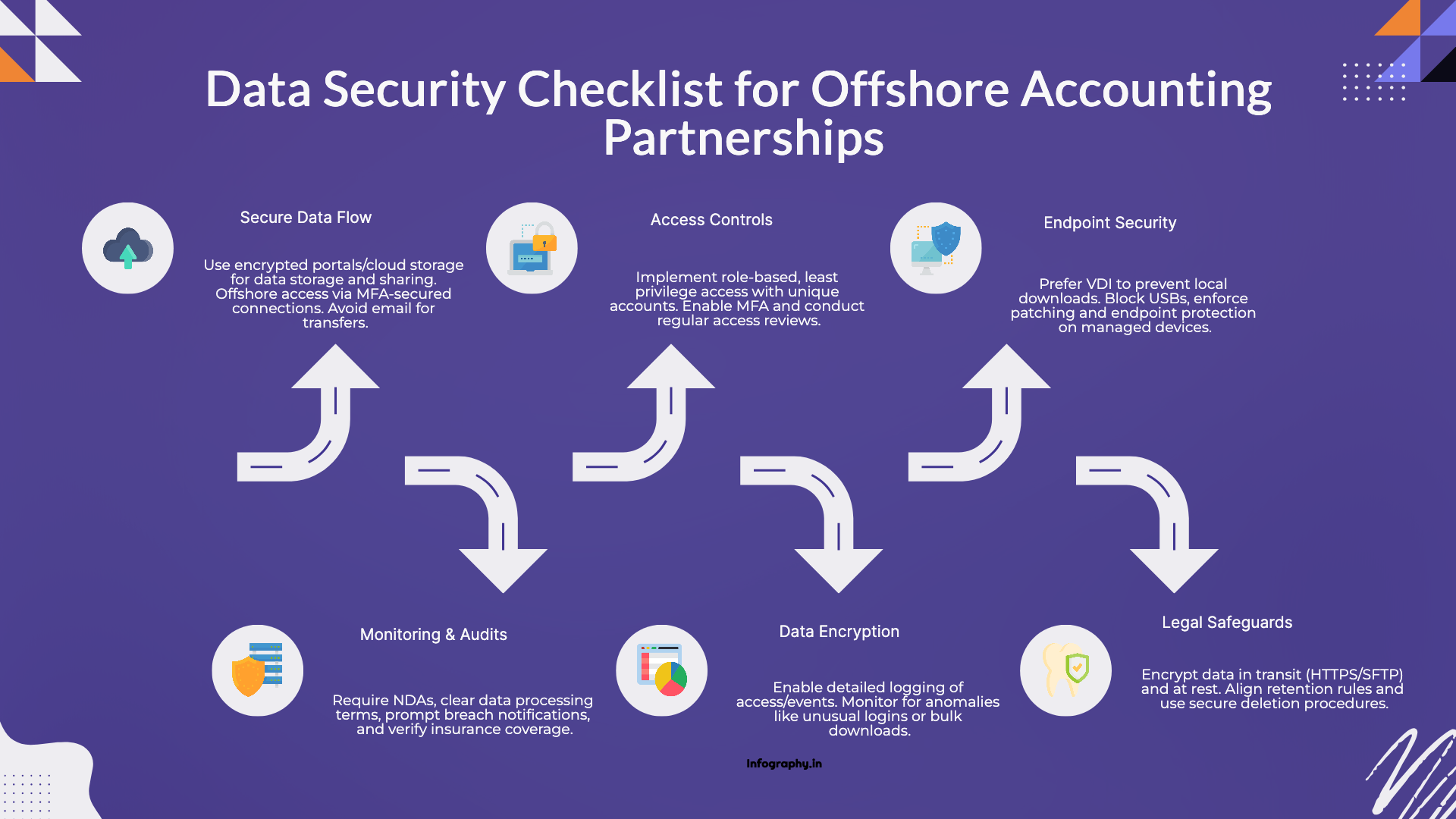
Before you evaluate security certifications and technical controls, answer basic questions about data flow. Where will client documents be stored while the offshore team works on them? How will the offshore team access accounting systems like QuickBooks or Xero? How are completed files shared back to your firm? If the answer to any of these questions involves email, stop and redesign the process. Email is not encrypted end-to-end, is difficult to audit, and is prone to user errors like sending files to wrong recipients.
Client data should live in secure portals or cloud storage systems with encryption, access controls, and activity logging. The offshore team should access accounting systems through secure connections with multi-factor authentication, not through shared passwords sent via email. Completed work should be uploaded to the same secure portal where you can retrieve it rather than sent as email attachments that sit in multiple inboxes.
Access control determines who can see client data, what they can do with it, and how access is granted and revoked. Poor access controls are the most common security failure in outsourcing relationships.
Role-based access means each person gets permissions appropriate to their role. A team member handling bank reconciliations for five clients should not have access to tax returns for fifty other clients. Access should be scoped to specific clients, specific file types, and specific tasks. This limits exposure if a credential is compromised or misused.
Least privilege access means granting the minimum permissions required to do the assigned work. No broad admin accounts. No all-access credentials that get shared among team members. Each person has their own account with carefully defined permissions that match their responsibilities.
Unique user accounts rather than shared logins create accountability and auditability. When multiple people share one login, you cannot track who accessed which files or when. Individual accounts with activity logging provide a clear audit trail that shows exactly who did what.
Multi-factor authentication should be enabled on every system that supports it and required for all users without exception. Passwords alone are not sufficient protection for sensitive financial data. MFA dramatically reduces the risk of unauthorized access from compromised credentials.
Access reviews should happen on a schedule, not just once during onboarding. Quarterly or monthly reviews confirm that each person still needs the access they have, that terminated employees or contractors have been deprovisioned promptly, and that access levels match current responsibilities. Access creep is common. Regular reviews prevent it.
The devices and environments where client data is accessed matter as much as access controls. If the offshore team is working on personal laptops in unsecured locations, even strong access controls cannot prevent data loss or unauthorized disclosure.
Virtual desktop infrastructure or controlled desktop environments are ideal. VDI means the offshore team accesses a virtual desktop hosted in a secure data center rather than downloading files to local devices. This prevents local file storage, limits copy-paste operations, and ensures that work happens in a controlled environment with security monitoring.
Local downloads should be blocked unless explicitly allowed for specific business reasons and logged for audit purposes. If files can be downloaded to personal devices, they can be lost, stolen, or accessed by unauthorized parties. Preventing downloads eliminates this risk.
USB ports and external media should be blocked or tightly controlled. Removable storage devices are a common vector for data exfiltration and malware introduction. Blocking or logging USB activity reduces these risks.
Managed devices with regular patching and endpoint protection ensure that the hardware and software used to access client data meet baseline security standards. Unpatched systems with outdated software are vulnerable to known exploits. Device management policies ensure that security updates are applied promptly.
Data must be protected both in transit and at rest. In transit means while data is moving between systems over networks. At rest means while data is stored on servers or in cloud storage.
Encryption in transit requires using protocols like HTTPS for web access, SFTP for file transfers, and secure portals rather than email. These protocols encrypt data during transmission so it cannot be intercepted and read by unauthorized parties.
Encryption at rest means stored documents are encrypted on the server or storage system. If the storage media is stolen or improperly disposed of, the encrypted data remains unreadable without decryption keys.
Document retention rules should match your firm's policies and regulatory requirements. If your firm retains client files for seven years, the offshore provider's retention policies should align. Automatic deletion after engagement completion may violate retention requirements or create audit issues.
Secure deletion procedures for terminated access ensure that when an offshore team member leaves or is reassigned, their access is revoked and any local copies of data are securely deleted. This should happen immediately, not days or weeks later.
Security controls are only effective if you can verify they are working and detect anomalies quickly. Monitoring and logging create visibility into who is accessing data and whether access patterns are normal or suspicious.
System logs should be enabled for all platforms and retained for a period sufficient to support investigations. Logs should capture login events, file access, file modifications, permission changes, and failed access attempts. Without logs, you have no evidence of what happened if a security question arises.
Login and file access events should be monitored for unusual patterns. Access from unexpected locations, access outside normal business hours, or bulk file downloads may indicate compromised credentials or malicious activity. Automated alerts can flag these patterns for immediate investigation.
If a breach occurs, logs are how you determine what data was accessed, by whom, and when. Without detailed logging, incident response becomes guesswork and notification to affected clients is imprecise. Logs are not optional. They are foundational to security and compliance.
Contracts and legal agreements do not prevent breaches, but they create accountability and define responsibilities when problems occur.
Non-disclosure agreements should be signed by the vendor organization and by individual staff members who will access client data. The agreement should specify data handling requirements, confidentiality obligations, permitted uses, and consequences for violations.
Data processing terms should be clear about who is the data controller and who is the processor. The firm retains control and responsibility. The provider is acting as a processor under the firm's direction. This distinction matters for regulatory compliance and liability allocation.
Breach notification timelines must be defined in writing. If the provider discovers unauthorized access or data loss, how quickly must they notify your firm? Twenty-four hours is reasonable. Thirty days is not. Speed matters for incident response and client notification.
Your professional liability insurance policy may have requirements or exclusions related to outsourcing. Review your policy and confirm that outsourcing is covered or obtain additional coverage if needed. Discovering coverage gaps after a breach is too late.
Use this checklist during vendor evaluation to identify providers with mature security programs. Providers who cannot answer these questions specifically or who treat security as an afterthought should be eliminated from consideration.
Use the checklist during implementation to confirm that controls are configured correctly before client data is shared. Do not assume security is handled properly. Verify it through documentation review, access testing, and process walkthroughs.
Use the checklist periodically to audit your ongoing security posture. Configurations drift over time. Staff turnover creates access cleanup issues. Regular audits ensure that security does not degrade through neglect or complacency.
Data security in offshore partnerships is not about achieving perfect invulnerability. It is about implementing reasonable controls that reduce risk to acceptable levels and create the ability to detect and respond to problems quickly. Firms that take security seriously and implement these controls can outsource with confidence. Firms that treat security as a checkbox rather than a discipline are exposing themselves and their clients to preventable risks.
Section 4960's 21% excise tax now reaches far more nonprofit employees. See who is a covered employee in 2026 and what changed.

The Section 45S paid family leave credit is permanent for 2026 with new options. See who qualifies, the amounts, and how to claim it.

Opportunity zones become permanent in 2027 under the One Big Beautiful Bill. See the new deferral, rural bonus, and the 2026 handoff.