


Some firms talk about artificial intelligence and automation like these technologies will solve all their staffing problems. Then reality arrives on Thursday night when a bank feed posts every transaction to the wrong account, and someone needs to manually reclassify three months of data before close. The promise of technology replacing human effort crashes into the messy reality of exception handling, judgment calls, and cleanup work that software cannot perform reliably.
Automation helps. Outsourcing helps. Neither replaces the need for structured workflows, clear processes, and human judgment. The question is not whether to choose one or the other. The question is how to combine them intelligently so each tool handles what it does best. Most firms already use both without explicitly planning it. The opportunity is to do it deliberately rather than reactively.
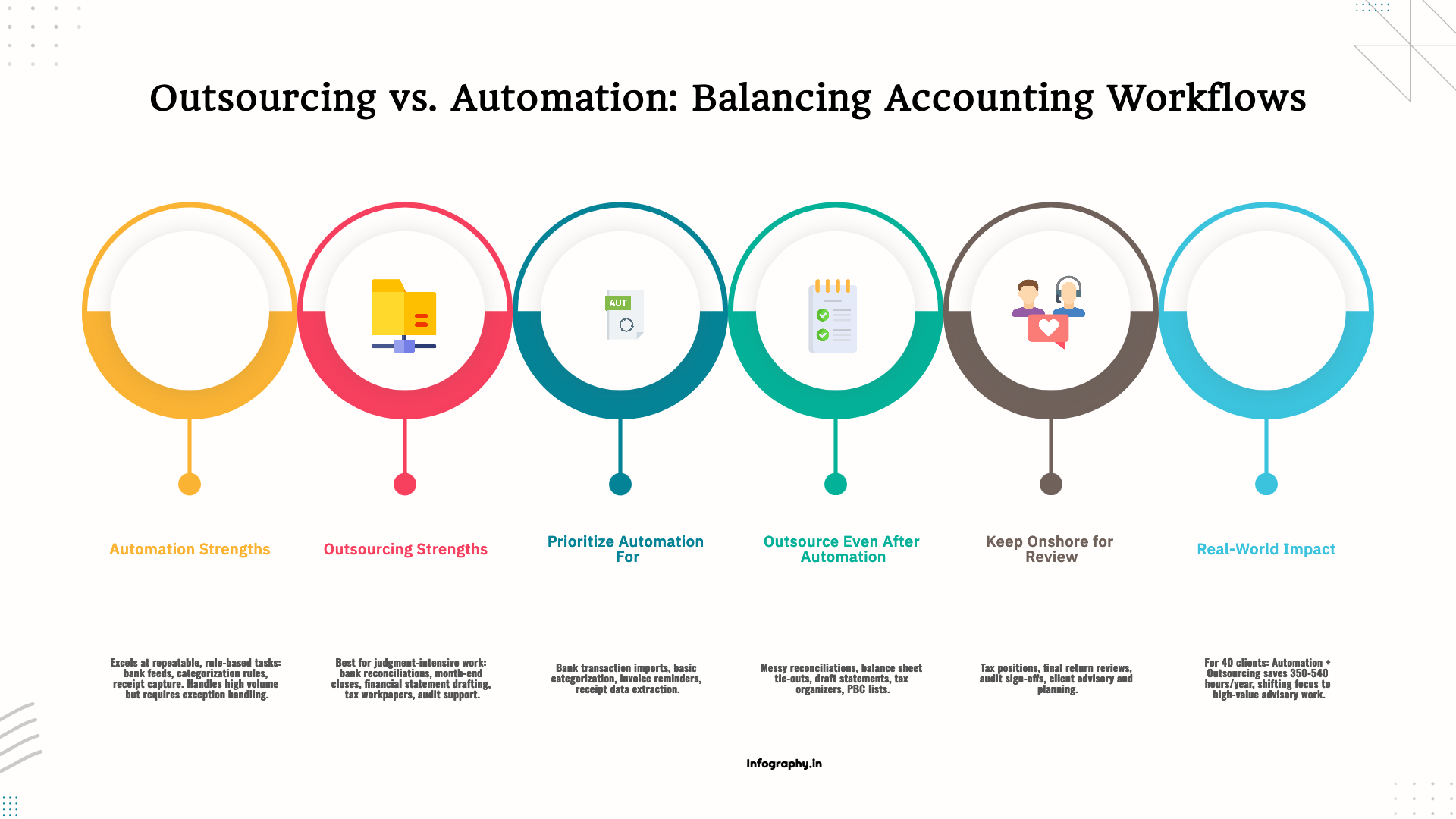
Automation excels at repeatable steps that follow clear rules with minimal variation. If a task can be described as a series of logical steps with predictable inputs and outputs, automation can handle it. Bank feeds import transactions. Categorization rules apply based on payee names or transaction descriptions. Receipt capture extracts data from images. These tasks are mechanical, repetitive, and low-risk when they work correctly.
The catch is that automation works until it does not. When transactions do not match the rules, when a vendor changes their name, when a bank feed imports duplicates, or when a receipt is photographed poorly, the automation breaks down. Someone needs to handle the exceptions, fix the errors, and make judgment calls about ambiguous situations. This exception handling is where automation stops being helpful and starts creating new work if not managed properly.
Outsourcing excels at repeatable work that requires human judgment, pattern recognition, and cleanup. An offshore team can handle bank reconciliations even when the feed is messy because they can investigate discrepancies, contact clients for clarification, and apply judgment about how to categorize unusual transactions. They can prepare financial statements even when the data is imperfect because they know how to identify errors, request missing information, and structure the output according to firm standards.
The division of labor is clear when you understand the strengths of each tool. Automation handles mechanical steps. Outsourcing handles exception-heavy preparation work. Onshore staff handle review, final judgment, and client communication. This three-layer model creates efficiency without sacrificing quality or accountability.
If a task is mechanical, follows consistent rules, and carries low risk when errors occur, automate it. Bank feeds and transaction import eliminate manual data entry for the majority of transactions. The feeds are not perfect, but they handle the volume and leave humans to deal with exceptions rather than entering every transaction manually.
Basic categorization rules apply patterns to incoming transactions. If a transaction comes from a known vendor and falls below a materiality threshold, the rule can categorize it automatically. These rules do not need to be sophisticated. Simple keyword matching and amount-based routing handle a surprising percentage of routine transactions.
Invoice reminders and accounts receivable nudges can be automated without sounding robotic or impersonal. Scheduled reminders sent at appropriate intervals keep receivables current without requiring staff to manually track aging and send individual emails. The automation handles the timing and delivery. Staff handle follow-up when clients do not respond or when disputes arise.
Receipt capture and document routing reduce manual filing and organization work. Clients photograph receipts, the software extracts key data, and the document routes to the appropriate folder or workflow queue. This eliminates the data entry bottleneck and makes it easier for clients to provide documentation promptly.
Automation does not mean the work disappears. It means the work shifts from manual execution to exception handling and quality control. Staff spend less time on data entry and more time investigating unusual transactions, resolving discrepancies, and ensuring that automated categorization is producing accurate results.
Automation reduces volume, but it does not eliminate the need for human judgment and cleanup. These tasks remain time-consuming and exception-heavy even after automation is implemented, which makes them good candidates for outsourcing.
Reconciliations and cleanup when feeds are messy still require human attention. Automated feeds create the starting point, but someone needs to reconcile the imported transactions to bank statements, investigate uncleared items, identify duplicates, and document adjustments. An offshore team can handle this work systematically, following firm procedures and escalating complex issues to onshore staff for resolution.
Month-end close support and balance sheet tie-outs involve too many judgment calls for full automation. The offshore team prepares schedules, ties out accounts, investigates variances, and documents their work. Automation may help with data extraction and calculation, but the analytical work and documentation require human effort.
Financial statement drafting for review benefits from templates and automation for data population, but someone still needs to format the statements, write narrative disclosures, calculate ratios, and ensure compliance with reporting standards. An offshore team can produce draft statements that the onshore team reviews and finalizes.
Tax workpaper assembly and organizer preparation involve too much variation for reliable automation. Client situations change, tax laws update, and forms require judgment about which schedules apply. An offshore team can assemble the workpapers, organize supporting documentation, and prepare organizers based on prior-year returns while flagging changes that require onshore attention.
Audit support tasks like PBC organization and first-draft workpapers follow documented procedures but require too much judgment for automation. The offshore team can organize client-provided documents, prepare lead schedules, perform tie-outs, and draft routine workpapers while the onshore audit team focuses on risk assessment, testing, and review.
Some tasks can be drafted by software or offshore staff, but they require onshore review and sign-off by licensed professionals who understand the client's situation and bear regulatory responsibility.
Tax positions and gray-area decisions involve professional judgment that cannot be delegated. Automated software can flag potential issues, and offshore staff can prepare workpapers, but the determination of whether a position is supportable requires CPA judgment and understanding of the client's facts and circumstances.
Final tax return review and signature remain the responsibility of the licensed CPA. The return may be prepared with assistance from automation and offshore support, but the CPA who signs assumes responsibility for its accuracy and compliance. This review cannot be automated or outsourced.
Audit sign-off and professional judgment calls about materiality, risk, and conclusions are inherently human decisions. Software can perform calculations and offshore teams can prepare documentation, but the auditor's opinion requires professional skepticism and judgment that only a licensed, experienced auditor can provide.
Client advisory and planning conversations require relationship, context, and strategic thinking. Clients do not want advice from software or offshore teams who do not know their business. They want trusted advisors who understand their goals and can recommend actions based on experience and judgment.
Consider a firm supporting forty monthly bookkeeping clients. Before implementing any changes, the onshore team spends approximately thirty hours per client per year on bookkeeping and close work, totaling twelve hundred hours annually. This time includes data entry, categorization, reconciliation, close support, and financial statement preparation.
The firm implements automation for receipt capture, bank feed import, and basic categorization rules. This automation reduces manual data handling by approximately twenty percent, saving about two hundred forty hours annually. Transactions still require review and exception handling, but the volume of manual entry decreases substantially.
The firm also outsources drafting work to an offshore team that handles reconciliation preparation, account analysis, and draft financial statements. This reduces onshore preparation time by an additional twenty-five percent, saving approximately three hundred hours annually. The onshore team shifts from preparation to review, which is faster and requires less time per client.
The combined savings are estimated at five hundred forty hours if the benefits do not overlap. In practice, some overlap occurs because automation and outsourcing both reduce data handling work. Even if the real savings are three hundred fifty to four hundred fifty hours, the improvement is significant. The freed capacity allows the firm to take on additional clients, reduce overtime, or redirect staff to advisory services.
The point is not the exact number. The point is the mechanism. Automation reduces raw transaction volume and eliminates repetitive data entry. Outsourcing reduces preparation workload and handles exception-heavy cleanup. Onshore staff focus on review, client communication, and advisory work that requires relationship and judgment. Each layer handles what it does best.
Start by mapping your current workflows and identifying where time is spent. Track how many hours go to data entry versus reconciliation versus review versus client communication. This visibility reveals where automation and outsourcing can have the most impact.
Automate the mechanical steps that follow consistent rules. If a task can be described with if-then logic and does not require judgment, try automation first. Measure the error rate and exception volume to confirm that automation is actually saving time rather than creating new cleanup work.
Outsource the preparation work that automation cannot handle reliably. If a task requires pattern recognition, judgment about ambiguous situations, or interaction with incomplete data, offshore support is likely more effective than trying to automate it. Focus on tasks where one reviewer can oversee the work of multiple preparers, creating leverage.
Keep review, sign-off, and client-facing work onshore with licensed professionals who have relationship context and regulatory responsibility. This is not just about compliance. It is about maintaining quality, client trust, and the professional judgment that distinguishes advisory services from commodity processing.
The future of accounting workflows is not about choosing between automation and outsourcing. It is about combining them intelligently so firms can handle higher volumes with better quality and more capacity for the advisory work that clients value most.

Section 4960's 21% excise tax now reaches far more nonprofit employees. See who is a covered employee in 2026 and what changed.

The Section 45S paid family leave credit is permanent for 2026 with new options. See who qualifies, the amounts, and how to claim it.

Opportunity zones become permanent in 2027 under the One Big Beautiful Bill. See the new deferral, rural bonus, and the 2026 handoff.